

Quick Summary
Capacitor discharge units are worth considering if your point motors throw weakly, run hot or need dependable operation across several turnouts. A capacitor discharge unit delivers a brief, strong pulse from stored charge, giving firm throws while limiting sustained current through the solenoid coil.
- Check that your CDU's input range and AC or DC requirement match your power supply.
- Confirm the unit is rated for the number of point motors you plan to throw simultaneously.
- Keep output wiring short and use a suitable gauge, as long thin runs weaken the pulse.
- Use a centre-off momentary switch as recommended. A correctly designed CDU delivers one brief pulse and then limits further current until the switch is released, helping protect the solenoid from sustained energisation. Always follow the CDU manufacturer’s wiring instructions.
- Test the point isolated from track power before fixing everything permanently.
Table of Contents
- What a Capacitor Discharge Unit Is and What It Does
- How a Capacitor Discharge Unit Works With a Point Motor
- The Main Benefits of Using Capacitor Discharge Units for Points
- Capacitor Discharge Unit Compatibility and Sizing
- Solenoid Point Motor Wiring: A Practical Walkthrough
- DCC Point Decoder Versus Capacitor Discharge Unit: Which Do You Need?
- Deciding on Your Next Step for Reliable Points
- Frequently Asked Questions
Are Capacitor Discharge Units Worth It for Your Points?
Last Updated: November 12, 2026
What a Capacitor Discharge Unit Is and What It Does
A capacitor discharge unit (CDU) is a small circuit that stores electrical energy and releases it as a short, strong pulse.
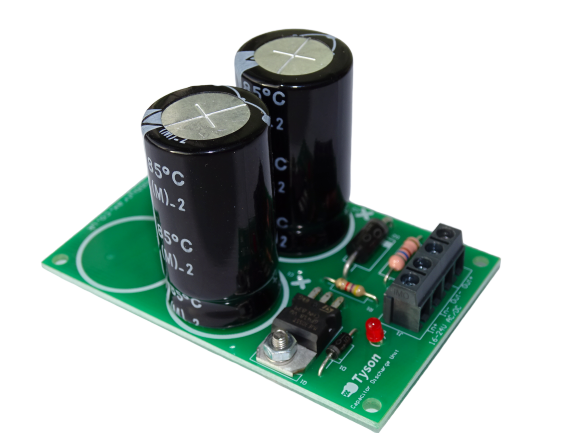
Twin-solenoid point motors require a brief, relatively high-current pulse to move the point blades. A CDU stores energy and releases it as that short pulse.
Watch out: Check that your CDU's input voltage matches your power supply before connecting anything. Wrong voltage can damage both the unit and the motor.
How a Capacitor Discharge Unit Works With a Point Motor
The unit charges its capacitors from your supply before each operation. When you operate the switch, the stored energy flows through the point motor's coil.
Here is the basic sequence:
- The CDU charges its capacitors from the power supply.
- You press the control switch to change the point.
- The capacitors discharge a strong pulse into the solenoid.
- The blade moves and the current drops off.
- The capacitors recharge, ready for the next throw.
The point motor only sees a short, sharp pulse rather than a long, steady flow. This is the main reason CDUs are used with solenoid motors.
The Main Benefits of Using Capacitor Discharge Units for Points
CDUs suit layouts with several point motors, but they bring a few specific advantages.

- Stronger, more consistent throws
- Less sustained current through the coils
- Delivers stored energy without demanding the full operating surge directly from the supply at the instant of switching.
A Stronger, More Reliable Throw
A CDU's pulse gives the solenoid enough force to throw the point fully every time. Weak or sluggish throws often cause derailments, so a firm throw is worth having.
Protecting Solenoid Coils From Burnout
Solenoid coils overheat if they stay energised for too long. Because a CDU delivers only a brief pulse, the coil is not held on under sustained current.
Watch out: A CDU protects the coil only when the control switch is released promptly. Holding the switch down can still cause problems.
The article points to three main advantages of a CDU for point motors, summarised below.
Benefit |
What it means |
Why it matters |
|---|---|---|
Stronger, more consistent throws |
Brief, strong pulse from stored charge |
Firm throws reduce derailments |
Less sustained current |
Pulse only, not a long steady flow |
Protects solenoid coils from burnout |
Steadier operation |
Performs when supply voltage varies |
Reliable throws across a layout |
Capacitor Discharge Unit Compatibility and Sizing
Choosing a CDU is not just a matter of buying the first unit that says "solenoid point motors" on the box. The right unit depends on the motor, the supply, the wiring and how many points you want to throw at once. Work through the checks below before you commit.
Start with the point motor
Solenoid point motors are the intended load for a CDU. Confirm the motor's coil voltage and current rating from its own instructions, and confirm the CDU is described as suitable for that family of motor. Check the listing and the motor instructions to confirm compatibility with your motor brand. Motors with built-in end switches or electronic drive (including many slow-action or DCC accessory motors) are a different case and generally should not be wired to a CDU output.
Match the input supply
Check the CDU's stated input range against your power supply, and check whether it expects AC or DC. The Tyson Capacitor Discharge Unit for Solenoid Point Motors is rated for 16-24V AC or DC, so confirm your supply falls inside that range before connecting anything.
Check Simultaneous Switching Capacity
The Tyson unit is suitable for most standard-sized layouts switching one or two point motors simultaneously; if you plan to throw more points at once, check the unit's rating rather than assuming it will cope.
Account for wiring length and resistance
Long runs of thin wire between the CDU and the point motor add resistance and reduce the pulse that reaches the coil. Keep output wiring short and use a sensible wire gauge for the current involved. If a point at the far end of the layout throws weakly while nearer ones are fine, wiring resistance is a likely cause before the CDU itself is at fault.
Decide how many motors at once
Operating two points together (for example, a crossover) is a common requirement. Confirm the CDU is rated for simultaneous operation of that number, and confirm your switch and wiring can carry the combined pulse. Operating more motors than the unit is rated for will weaken every throw and can stress the unit.
Check the physical fit
Measure the space under the baseboard or behind the control panel before buying. Confirm the board dimensions, mounting holes and terminal layout suit your installation, and leave room for the wiring to route away from heat sources.
A quick pre-purchase checklist:
- Motor type and coil rating confirmed from the motor instructions
- CDU input range and AC/DC requirement matched to your supply
- Capacitor size and recharge time acceptable for your operating pace
- Number of simultaneous motors within the unit's rating
- Output wiring length and gauge sensible for the layout
- Board size and mounting suit the available space
If any of these cannot be confirmed from the listing or instructions, ask before buying rather than guessing.
Solenoid Point Motor Wiring: A Practical Walkthrough
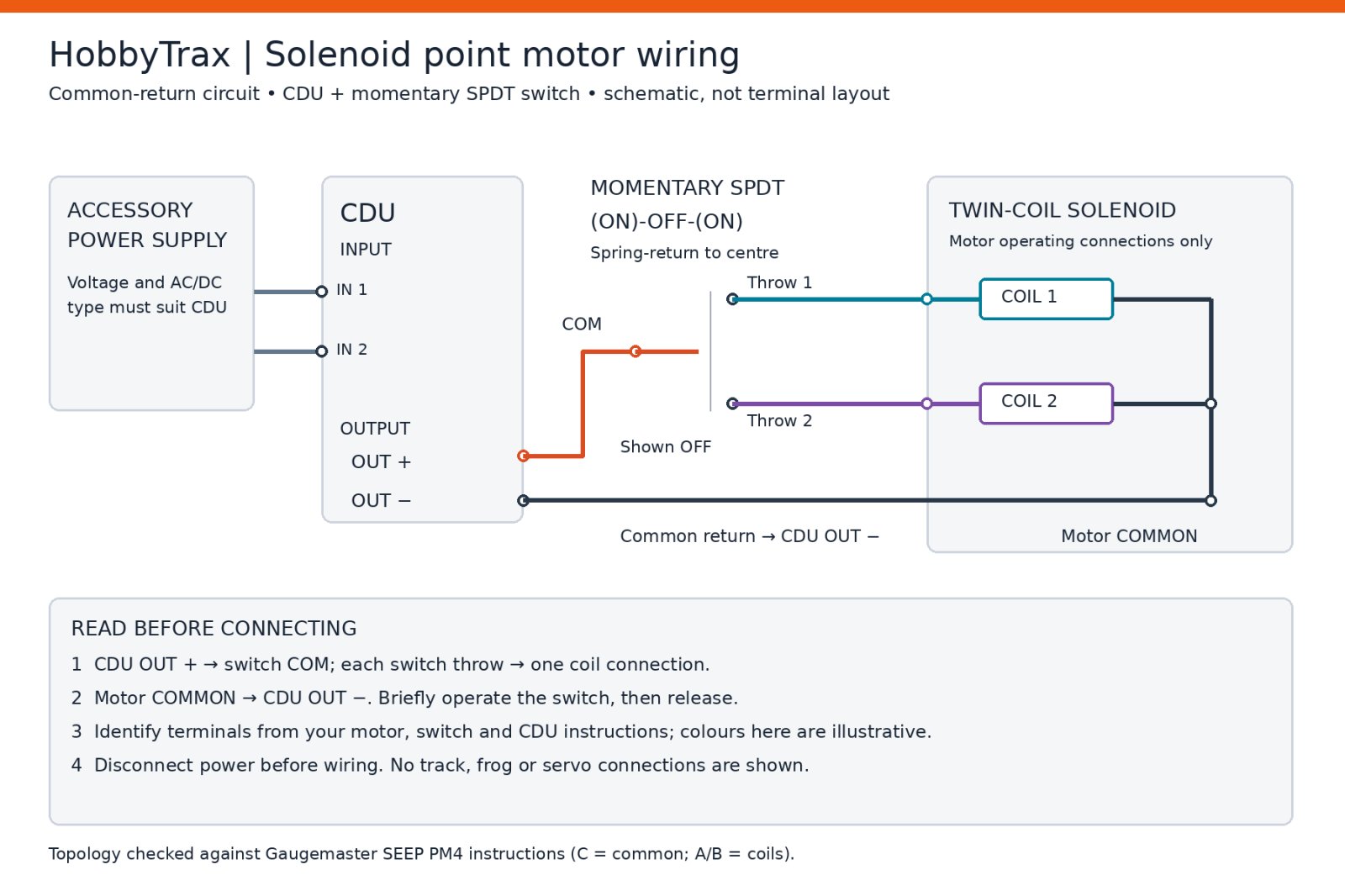
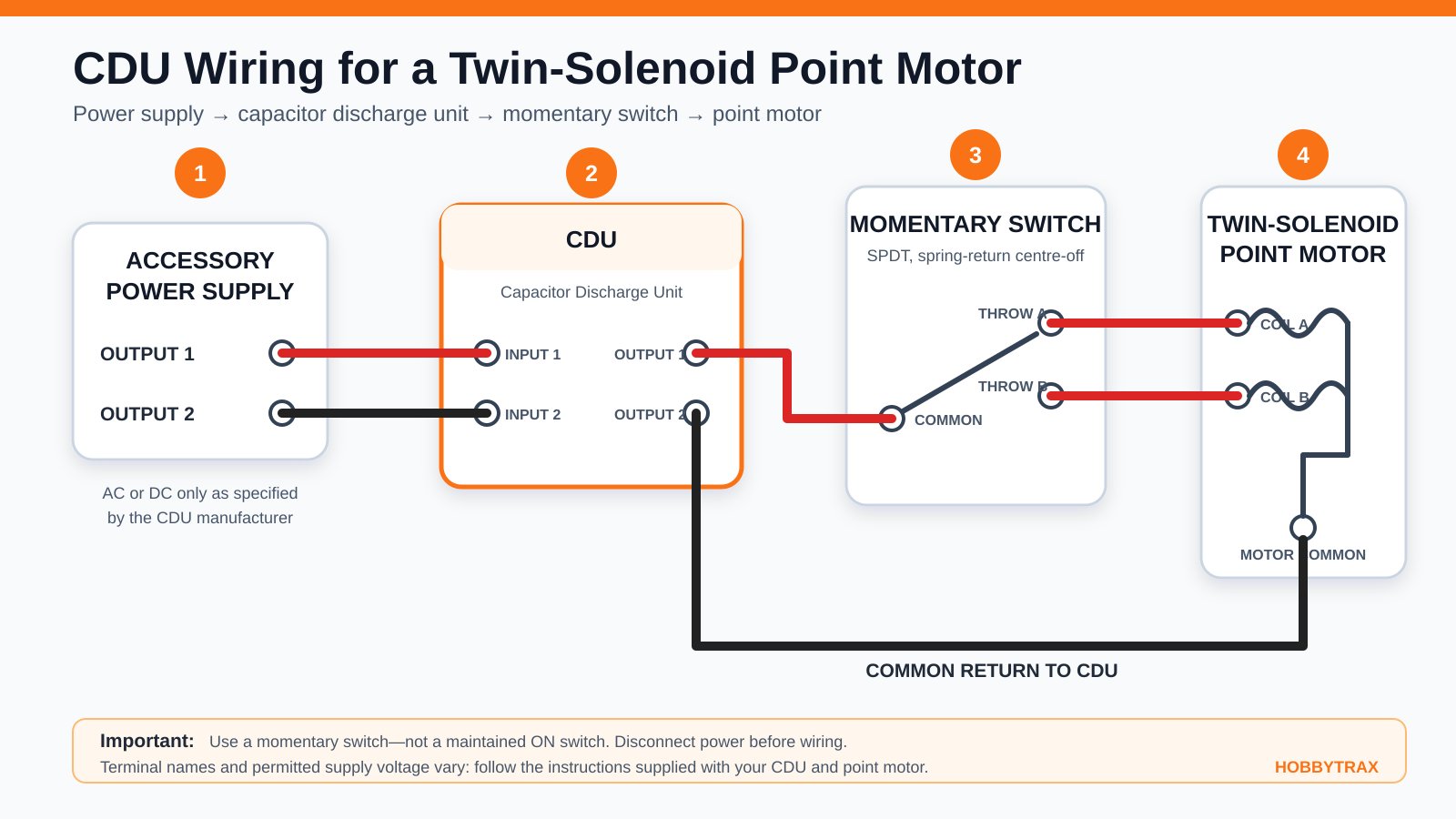
This walkthrough assumes a solenoid point motor, a CDU and a momentary control switch. Always work with the power off and unplugged while making connections, and double-check polarity and terminal assignments against the CDU and motor instructions before applying power.
Before you start
Gather the CDU, the point motor and its instructions, a centre-biased momentary switch, suitable wire, a small screwdriver and a multimeter if you have one. Identify the CDU input and output terminals, the motor's coil terminals and the switch's common and throw contacts. If any of these are unclear from the instructions, stop and confirm before wiring.
Step 1: Mount the CDU
Fix the CDU under the baseboard or on the control panel, away from heat sources and clear of moving parts. Leave enough room to reach the terminals with a screwdriver and to route wiring neatly.
Step 2: Connect the power supply
Connect the supply to the CDU input terminals, observing the AC/DC requirement and voltage range in the instructions. Do not power up yet.
Step 3: Wire the control switch
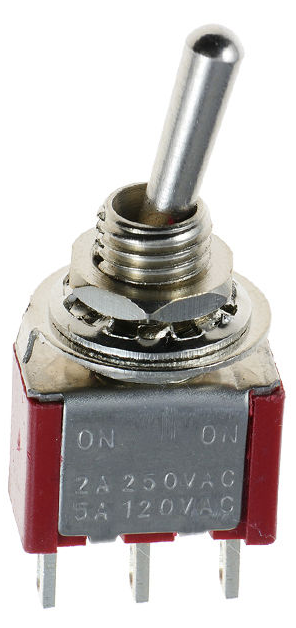
Use a centre-biased SPDT momentary switch, such as the Mini SPDT Momentary Toggle Switch - (ON)-OFF-(ON), which suits pulse control of point motors. Wire the switch so that each throw direction connects the CDU output to the appropriate motor coil terminal, following the motor's own wiring diagram.
Watch out: Reversing the switch wiring can send the pulse to the wrong coil or leave a coil energised; check the diagram twice before powering up.
Step 4: Connect the point motor
Connect the motor's coil terminals to the CDU output via the switch, following the motor instructions. Keep output wiring as short as practical and use a gauge suited to the pulse current.
Step 5: Add a position indicator (optional)
If you want a mimic panel showing point position, fit a microswitch. The Solenoid Point Motor Microswitch Mounting Kit - Peco PL-13/PL-15 Equivalent is a mounting plate for compatible Peco or Hornby solenoid point motors and offers one or two switches. Wire the microswitch to your indicator circuit separately from the CDU output.
Step 6: Test before permanent fitting
With the point isolated from track power, apply supply to the CDU and operate the switch several times. Confirm the point throws fully in both directions, the control switch returns to centre when released and the CDU recharges before another operation. Check for binding, loose linkages and any sign of overheating. Only then fix everything permanently.
Troubleshooting by symptom
- Weak or partial throw: check output wiring length and gauge, confirm the CDU is rated for the motor, and check for binding in the point mechanism.
- No throw at all: Match the supply voltage and AC/DC type to the CDU instructions. When using DC, observe any marked positive and negative input terminals. AC inputs do not have positive and negative polarity.
- Slow recharge between operations: the capacitor may be large for the supply, or the supply may be at the low end of the range; check the CDU rating against your supply.
- Repeated operation failures: confirm the switch is momentary and not being held, and check that the CDU is not being asked to drive more motors than rated.
- Overheating: disconnect power immediately and check for a short, a stuck switch or a motor coil that is being held energised.
Common mistakes to avoid:
- Reversing polarity on the switch or motor wiring
- Confusing the point motor’s common return with one of its two coil connections.
- Skipping the test stage before permanent fixing
- Using a switch that can be left on
- If a point still throws weakly, disconnect the linkage and check for binding, incorrect motor alignment, ballast obstruction or stiff point blades. Do not use additional electrical power to overcome a mechanical fault.
For more detail on connecting point motors and switches, the Hobby Trax Helpsheet - Wiring solenoid point motors covers simple point motors, crossovers and frog switching. It is free and sent by email.
DCC Point Decoder Versus Capacitor Discharge Unit: Which Do You Need?
A DCC point decoder and a CDU do different jobs, and they are not interchangeable.
- A DCC point decoder receives commands from a DCC controller and operates the point, often with a built-in pulse function.
- A CDU supplies the pulse energy to a solenoid motor, triggered by a control switch.
If your layout runs on DCC and your decoder already provides a suitable pulse, you may not need a CDU. If you run analogue DC or a manual switching panel, a CDU is often the right choice. Always check your decoder's specifications and your motor's requirements before combining them.
Deciding on Your Next Step for Reliable Points
A CDU is worth considering if your points are sluggish, your motors run hot, or you want a dependable throw across several turnouts. Start by confirming your motor type, voltage and control method.
If you are unsure whether a CDU suits your setup, browse the Tyson Capacitor Discharge Unit and the wiring helpsheet, then contact HobbyTrax with your layout details for compatibility advice.
*A note from HobbyTrax: This article reflects our practical modelling experience and information available at the time of writing.
Frequently Asked Questions
What does a capacitor discharge unit do on a model railway?
A capacitor discharge unit, or CDU, stores electrical energy in its capacitors and releases it as a short, strong pulse to a solenoid point motor. That pulse throws the point firmly from one position to the other. Because the capacitors recharge between operations, the unit delivers a controlled burst of power rather than a sustained current, which helps the point motor move reliably without the coil drawing excessive current for longer than needed.
Can a capacitor discharge unit operate more than one point motor at a time?
The HobbyTrax Tyson capacitor discharge unit is suitable for most standard-sized layouts switching one or two point motors simultaneously. Check the product listing and the included instructions before connecting more than one motor, as the number of motors a unit can drive depends on its design and supply. Where a layout needs more motors, plan the wiring so each unit's limits are respected.
Do I need a DCC point decoder or a capacitor discharge unit?
These are different tools. Many DCC accessory decoders designed for solenoid point motors already include capacitive discharge or controlled pulse output. Never connect a separate CDU to an accessory decoder’s output unless the decoder manufacturer specifically permits it. An incompatible combination could damage the decoder or CDU.
What should I check if a point motor does not operate reliably?
Start by checking the power supply voltage is within the range your unit specifies, and confirm the wiring matches the instructions. Look for loose screw terminals, reversed connections or damaged joints, and make sure the point is free of obstructions. Test the point motor on its own before refitting it permanently. Always isolate power before making changes, and refer any mains-related work to a licensed electrician.
