

Table of Contents
- What Beginners Actually Need From a DCC Train Control System
- Quick Comparison: Beginner DCC Train Control Options
- Starter Sets vs Standalone Controllers: Which Suits Your Layout?
- DCC Decoder Installation Guide: Getting Your Locos Ready
- How to Program DCC Locomotives (Without the Headaches)
- Best DCC Stay-Alive Capacitors and Why They Matter
- Common Beginner Mistakes and How to Avoid Them
- Frequently Asked Questions
Last Updated: September 21, 2026
What Beginners Actually Need From a DCC Train Control System
The best DCC train control system for beginners is one that matches your layout size, your budget and your willingness to learn, not the one with the longest feature list. At HobbyTrax, we understand that plenty of newcomers buy more controllers than they'll ever use, then get frustrated by menus they don't understand. A simple system that runs two trains smoothly beats a complex one sitting in its box.
DCC train control works by sending digital commands through the track to a decoder inside each locomotive; these little coded packets contain all the detail the train needs for sound, speed, and lighting, as well as signals, and anything else on the track. Every loco gets its own address, so you drive them independently on the same piece of track. That single idea is what separates DCC from analogue control, and it's worth understanding before you spend anything.
Decide This Before You Compare Controllers
Three questions settle most of the decision:
- How big is your layout? A shelf layout with two points needs far less than a double-track main line with a yard.
- How many locos will run at once? Two or three is typical for a beginner. Ten or 20 may require a different solution.
- Do you want sound? Sound decoders draw more current and need a controller that can supply it. (I personally have a mix of both)
Answer those honestly and the shortlist writes itself. Our free Hobby Trax Helpsheet - Analogue vs Digital - The Basics walks through the differences if you're still weighing up whether to switch at all.

Quick Comparison: Beginner DCC Train Control Options
Beginners generally choose between a starter set with a basic controller included, or a standalone command station bought separately. Both approaches work. The right answer depends on whether you already own locomotives and want to add control, or you're starting from nothing.
Option |
Best For |
Typical Setup |
Watch Out For |
|---|---|---|---|
Starter set with controller |
Complete beginners |
Loco, track and controller in one box |
Limited upgrade path |
Standalone entry controller |
Existing loco collection |
Buy controller and decoders separately |
You supply track and locos |
Mid-range command station |
Growing layouts |
More addresses and functions |
More menus to learn |
Controller with programming track |
Anyone fitting decoders |
Dedicated programming output |
Not all controllers include one |
What to Look For at a Glance
Check four things on any controller: how many locomotives it can run at once, how many functions it supports, whether it has a separate programming output, and whether spare parts are easy to get. That last point matters. A controller you can't get a replacement cable for in two years is a dead end.

Starter Sets vs Standalone Controllers: Which Suits Your Layout?
Starter sets suit newcomers with nothing on the bench. You get a locomotive, some track and a controller that all work together out of the box, which removes a lot of early guesswork.

Standalone controllers suit anyone who already has locomotives and track. You buy the command station, then add decoders to your existing fleet one at a time. It costs more upfront but gives you a system you can grow into rather than replace.
Here's the honest trade-off. Starter set controllers are often limited on addresses and functions, and some can't be expanded. Standalone entry controllers usually offer a clearer upgrade path. If you think you'll still be in the hobby in five years, buy the standalone unit.
One feature worth paying attention to is the programming output. Some controllers have dedicated programming terminals, and some don't. The TCS LT-50, for example, lacks them, which is exactly why we stock the TCS LT-50 DCC Programming Track Switch at $29.95. It adds a switchable programming track with a simple plug-and-play fit and no soldering.
If we look at the top (most used, maybe) contorllers in 2026 it would be
- - Hornby HM7000 for beginners,
- - ESU ECoS 50220 for premium layouts,
- - Digitrax DCS52 Zephyr Express for robust operations,
- - NCE Power Cab for traditional handheld control, and
- - Gaugemaster Infinity for wireless middle-ground simplicity
- - Hornby R8214 Elite' Digital Controller. On our layout, which is approx. 6m by 6m with 50-plus engines, we use the Hornby Elite with an R7326 HM7040: Bluetooth® Legacy Dongle and then Hornby HM DCC on a Samsung notepad.
DCC Decoder Installation Guide: Getting Your Locos Ready
Decoder installation is where most beginners hesitate, and it can be easier than the forums make it sound. The key is matching the decoder type to your locomotive's socket, then testing before anything goes near the body shell.
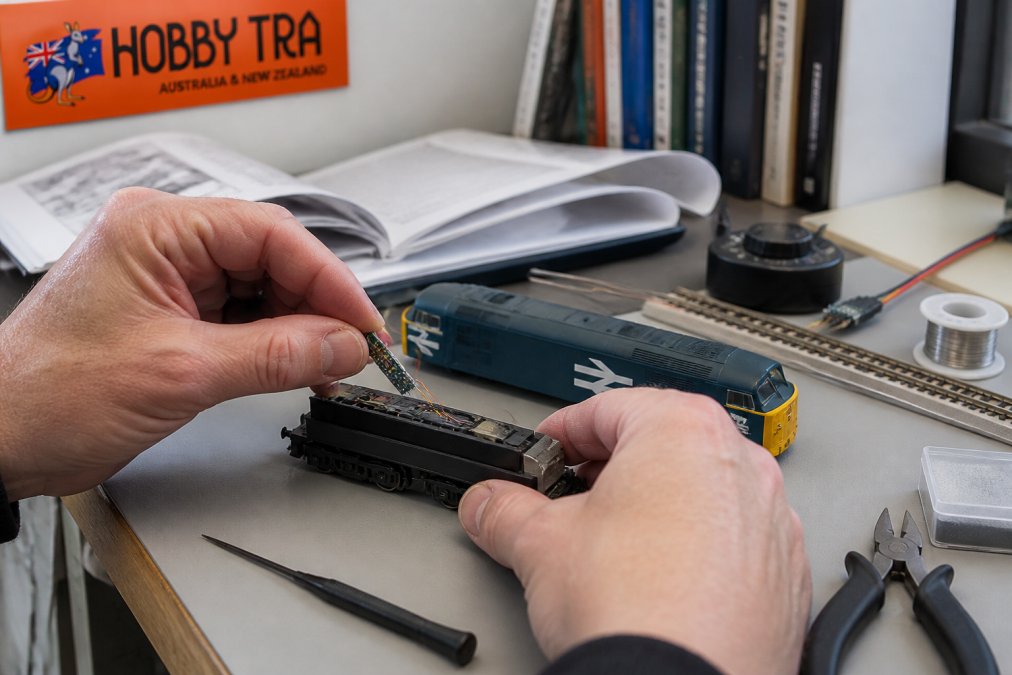
Start by identifying what you've got:
- DCC ready with a socket: Look for 6-pin, 8-pin, 21-pin, Next18 or PluX22. The decoder plugs straight in.
- DCC ready, no socket: You'll need to hardwire the decoder to the motor and pickups.
- Older loco, no provision: Hardwiring is the only route, and it takes patience.
Our free Hobby Trax Helpsheet - Understanding DCC decoder types explains the socket types if the numbers mean nothing yet. For older models, the Hobby Trax Helpsheet - Hardwiring DCC decoders covers the wiring order.
Hobby Trax Helpsheet - Analogue vs →
Testing Decoders Before They Go Anywhere Near a Loco
Test every decoder before installation. Fitting a faulty decoder, reassembling the loco, then discovering the problem wastes an evening.
The DCC Decoder Tester for 6-Pin, 8-Pin and 21-Pin Decoders at $49.95 does exactly this. Plug the decoder in, connect the tester to your track, and operate as normal. LED indicators show direction, track power and function outputs, and it also handles hardwired decoders.
How to Program DCC Locomotives (Without the Headaches)
Programming a DCC locomotive means giving it a unique address and setting its running characteristics so it behaves the way you want. Most beginners only need to change two things: the address and the motor speed curve.
The process is straightforward:
- Place the loco on your programming track, isolated from the main line.
- Select program mode on your controller.
- Read the existing address so you know what you're changing.
- Write a new address between 1 and 127 for simplicity.
- Test on the main line. If it moves, you're done.
Best DCC Stay-Alive Capacitors and Why They Matter
Stay-alive capacitors keep a locomotive running through dirty track, dead frogs and momentary power loss. They store a small charge and release it when the decoder loses pickup, which stops the stutter that plagues short-wheelbase locos. HobbyTrax only supplies DC stay-alives at present, as many are already DCC.
A few practical points:
- Shorter locos benefit most. Four-wheel shunters and small tank engines lose pickup constantly.
- Sound decoders need them more. A sound decoder restarting mid-chuff is worse than a silent stall.
- Fit them where there's space. Under the roof or in the bunker usually works.
Common Beginner Mistakes and How to Avoid Them
- Running before reading. Ten minutes with the controller manual saves a week of forum posts.
- Forgetting to isolate the programming track. Programming on the main line can reprogram every loco on the layout.
- Skipping the bus wires. Relying on rail joiners (Code 100 Fishplates) for power causes voltage drop at the far end. Our Hobby Trax Helpsheet - DCC Bus wiring covers wire thickness and routing.
- No short-circuit protection. A derailment that shorts the track can stress a budget controller. The Hornby Select DCC Power Saver Short-Circuit Protection Device at $16.95 fits between a compatible Hornby Select and the track cable, limits current during a short, then resets automatically. Check your controller model and power supply before ordering, because it isn't suitable for every setup.
-
Spike protection. You may often come across the odd and unusual problem of runaway locos or ones that sometimes just don't respond. This is often due to corruption of your DCC bus signals. The signal leaves your controller just fine, but by the time it's got through your wiring and track, it can get corrupted, and so the decoder either ignores the command or just keeps going! HobbyTrax supplies Spike Buster and Protection for this.
These little devices are designed to fit as a pair to the ends of your DCC bus. You don't need more that two regardless of how big your layout is.
- Buying decoders before checking sockets. Match the decoder to the loco, not the other way round.
We'd genuinely like to see how your first DCC conversion turns out. Send us a photo of your layout or your installation, as it might help the next beginner avoid similar pitfalls.
Frequently Asked Questions
What is the easiest DCC system to use for a beginner?
The easiest setups for newcomers are starter sets with a handheld throttle and clear labelling, because you can run trains on address 3 straight out of the box. Look for a system with dedicated programming track terminals, or add a programming track switch if your controller lacks them. A decoder tester is also worth having so you can confirm a decoder works before fitting it, rather than fault-finding inside a loco.
Do I need a computer to run a DCC train layout?
No. A standalone DCC train control system runs perfectly well on its own, and most beginners never connect a computer. You only need one if you want computer control, automation or advanced programming software. Start with the throttle and add computer control later if your interest grows. Many controllers let you adjust addresses, speed steps and lighting functions directly from the handset.
Can I upgrade my beginner DCC system later?
Yes, and most people do. Beginner controllers can usually be expanded with extra throttles, boosters and accessory decoders, while decoders and stay-alive capacitors carry over to a bigger system. If you already run analogue, our free helpsheet on upgrading your layout from DC to DCC walks through the changeover. Plan your wiring now, because a proper DCC bus makes later upgrades far simpler.
Are all DCC decoders compatible with every controller?
In practice, most decoders follow the same DCC standard, so they will run on most controllers. The real compatibility questions are the physical plug type (6-pin, 8-pin, 21-pin, Next18, PluX22 or hardwired) and the current rating for your loco. Check the socket in your model before buying, and use our free helpsheet on understanding DCC decoder types if the names are unfamiliar.
What is the difference between a starter set and a standalone DCC controller?
A starter set bundles a controller, power supply and often a locomotive and track, so you can run trains immediately. A standalone controller is just the command station and throttle, letting you choose your own locos, decoders and track. Beginners usually do well with a starter set first, then add a programming track switch, decoder tester and sound speakers as the layout grows.